

It’s all about AI Sovereignty these days. My personal echo chamber is teeming with videos, posts, and blogs about running AI locally and building a home AI lab. Don’t worry, I won’t bore you with all the details of how I built an AI lab or the tedious details of how to choose the right model, which model server to use, the advantages of SGLang over LMStudio, quantization and GGUF, etc. Honestly, I didn’t bother with any of those details either. I cheated. I simply asked Claude Code (Opus 5.5) to “Figure out which AI model to locally host on my MacBook Pro (M5 Pro, 48GB). I need Claude Desktop-like functionality with Cowork with computer use. Choose the right model and model server for my hardware. Make no mistakes.” That’s it, and Claude Code figured out the entire stack for me and installed and configured everything.
The last time I used a local LLM was in 2024, with Ollama serving Llama 3 8B. Agentic AI and computer and tool use were either unheard of or very nascent, and my experience left a lot to be desired, so I fell back on the trusty GPT-4o. I never even considered local AI because the upfront cost and cognitive bandwidth required to set it up didn’t justify it. Recently, arguments about vendor lock-in, platform capture, and tech monopoly deemed it important enough to convince me to start taking steps toward sovereign AI infrastructure. However, I was pleasantly surprised by how far technology has progressed in the past two years. This includes both open-source AI models and local AI infrastructure. I have also realized that to accomplish anything tangible with AI models, using the right harness is equally, if not more, important than having access to the latest models.
My Claude-chosen stack consists of Qwen3-30B-A3B-Instruct-2507 with 6-bit quantization, served via LM Studio as an MLX model. This takes up about 23 GB of memory, plus up to 6.4 GB allocated for KV cache, leaving the rest of the 48 GB for macOS itself and any other apps. Context length set to 32K. The harness that Claude chose for me is called Goose, and it is fairly familiar to my beloved Claude Desktop. Goose provides tool use and computer use, so it can work within my local git repo and access my knowledge base in my local Obsidian vault. Goose also has a memory feature, so if I choose a different model in the future, my memories and preferences aren’t lost.
Claude measured my Mac’s memory bandwidth, then picked a mixture-of-experts model to get the knowledge of a big model at the speed of a small one. It chose LM Studio over Ollama because it’s faster on Apple Silicon, and Goose because it’s open source and keeps my memories on my side. It used 6-bit quantization for extra accuracy, which runs at 63 tokens/second. To put that in perspective, the big cloud models typically stream somewhere between 50 and 100. So my MacBook at 63 tokens/s feels instant enough with no noticeable lag on my part. My only gripe is that the model I chose, which is limited by my hardware, is equivalent to Claude 3.5 Sonnet, so I have to do some prompt engineering to make sure it clearly understands my intent. I have been spoiled by Claude 5.5-class models, which are excellent at understanding intent.
The tasks I have tried include general interactive chat across my MacBook, my Debian laptop, and my phone, with no noticeable lag. I use AI for learning new topics with AI role-playing as my coach, guiding me on topics, quizzing me, and verifying the code snippets, where Qwen3-30B was a pro; after tweaking a few initial instructions, it knew its role and assignment exactly. Finally, code generation was on par, at least on the Data Engineering tasks, with generating bits of code, reviewing and fixing bugs/erros. The only place my local AI has failed miserably so far is a long-horizon “video-as-a-code” job. My Claude Sonnet 5.5 has evolved into something of an expert video editor, using WhisperX, ffmpeg, and Hyperplanes to turn raw footage into a final cut. I can just give it my raw video clips and expect it to produce the final cut overnight, replete with motion graphics and music, working completely unsupervised. My local AI model didn’t even understand the assignment: how to use my tried, tested, and honed video-editor skills. Maybe this is where I will need a “GPT-OSS-120B” class of model running on a beefier 128GB machine (or maybe need a different harness for the workflow). But I am not ready to splurge on such a kind of infra yet, so safe to say I am not canceling my Claude subscription yet, just augmenting it with local AI for trivial enough tasks.
In conclusion, I was a local AI naysayer until recently. My argument was: why invest thousands of dollars in local infrastructure when a couple hundred dollars a month gets you all-you-can-eat tokens for a novice-to-medium user (not true for advanced users)? However, lately I am convinced that the cost per token we’re paying today is heavily subsidized by venture capital and isn’t the true cost per token. The bill is bound to come due for the frontier labs, data centers, and API providers, and when those costs trickle down to us, I don’t want to be in a ‘pay-up or get locked out’ situation. A self-hosted AI platform, the tooling and workflows around it, and the skills to host, tune, and use it are my hedge against the inevitable trap of platform capture.
The Gory Details
How Claude chose the stack
Before picking anything, Claude wrote a small C benchmark (STREAM style: copy, scale, add and triad over three 512 MB arrays) to measure my memory bandwidth. A single core pulled 128 GB/s, and all 18 cores peaked around 255 GB/s. Memory bandwidth matters more than anything else for local AI. Tokens per second is roughly bandwidth divided by how much of the model has to be read per token.
That’s why Claude chose a mixture-of-experts model over a dense one. Qwen3-30B-A3B has 30.5 billion parameters, but they’re split into 128 experts, and only 8 of them work on any given token, about 3.3 billion parameters in all (“A3B” literally means 3B active). A dense 32B model has to read every weight for every token, and Claude estimated that would land at 10 to 13 tokens/second on my machine. It also picked the Instruct-2507 version because it’s better at following instructions and making tool calls.
For the model server, Claude actually recommended Ollama first, because it runs identically on macOS and Debian. However, my plan was to make the MacBook the only server, and once I pointed that out, Claude switched to LM Studio. LM Studio runs models in Apple’s MLX format, which is faster on Apple Silicon than the GGUF format Ollama uses. SGLang and vLLM were ruled out because they’re built for NVIDIA GPUs.
Why Goose
Claude chose Goose as the harness because it’s open source, it has a desktop app and a CLI for both macOS and Debian, and it ships with a built-in LM Studio provider. Tools like shell access and file editing come in as MCP extensions, the same plug-in standard Claude uses. The important part for me is that Goose runs its tools on whichever machine Goose is on, while only the model runs on the Mac. So Goose on my Debian box edits Debian files, using my MacBook’s GPU as the brain. Memories live as plain files on the Goose side, so swapping the model later won’t cost me anything.
Benchmarks: 4-bit vs 6-bit
Then Claude benchmarked two quantizations of the same model, 4-bit and 6-bit, head to head. It wrote a small Python test that hits the server over my LAN.
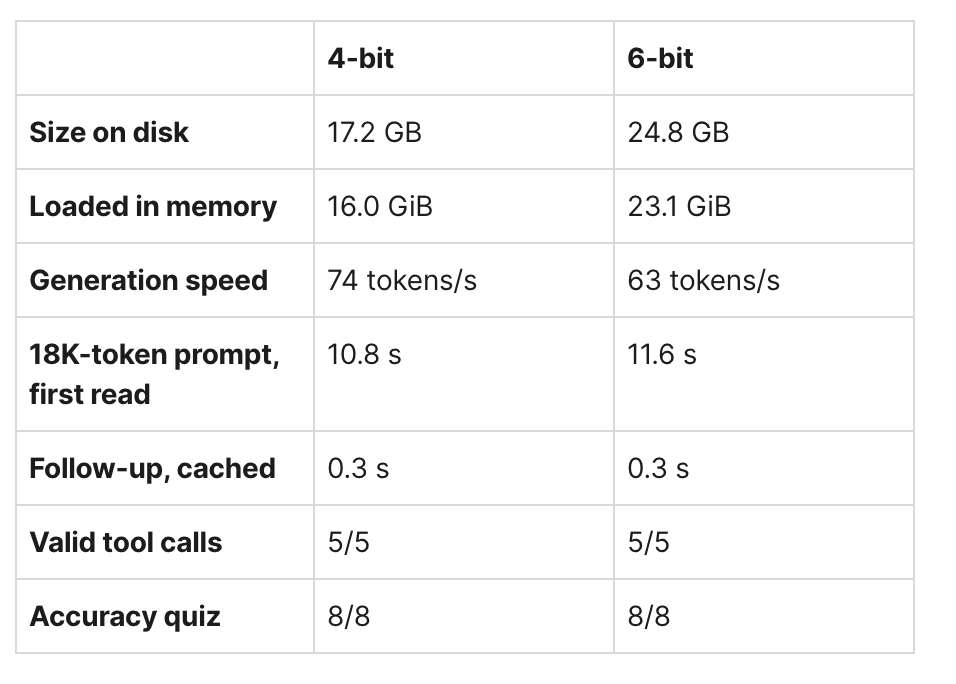
The 6-bit is about 15% slower, and my human cognition couldn’t tell them apart. I went with 6-bit anyway, because quantization is supposed to matter for long multi-step work, and 63 tokens/second is still faster than I can read.
How to replicate this on your machine
You don’t need my hardware or follow my choices. Just copy the prompt below into Claude Code (or your choice of AI Agent) on the machine you want to use as your AI server. It measures your hardware first, then asks you a handful of questions. If you don’t know an answer, pick the one marked “(Recommended)” and move on.
Set up a local, self-hosted AI stack on this machine for me, end to end: model, model server and agent harness. Pick everything based on my actual hardware, not on general advice.

Step 1. Inspect the hardware. Report the CPU, GPU(s) and VRAM, total RAM (and whether it's unified memory), free disk space and OS version. Then write and run a small STREAM-style memory bandwidth benchmark (copy, scale, add, triad over arrays far larger than cache) at a few thread counts and report the peak GB/s. On a machine with a discrete GPU, also note the GPU's memory bandwidth. Explain in two or three sentences what these numbers mean for token generation speed.

Step 2. Ask me about my preferences before choosing anything. Ask in small batches, give each question a recommended default, and if I say "I don't know" or skip a question, use the default:
  1. Main use: general chat and writing, coding, or both? (Recommended: both)
  2. Priority: fastest responses, best quality, or balanced? (Recommended: balanced, at least 30 tokens/second)
  3. Will other devices on my network use this machine as their AI server? If yes, which OS are they? (Recommended: just this machine for now)
  4. Agent harness: Goose, or let you suggest one? I want something like Claude Desktop with tool use, file access and memory that lives on my side, not the model's. (Recommended: Goose)
  5. Model server: let you choose based on my hardware, or do I have a preference such as Ollama or LM Studio? (Recommended: let you choose)
  6. Context length: 32K, 64K or 128K? (Recommended: 32K, raise it later only if memory allows)
  7. Disk space you may use for model downloads? (Recommended: up to 40 GB)
  8. Start the server automatically at login, or start it myself with one command? (Recommended: start it myself)
  9. Access from outside my home network? (Recommended: no, LAN only. If yes, use Tailscale, never open ports on the router)
  10. Where should the setup guide and test scripts go? (Recommended: a folder named local-llm-setup in my home directory)

Step 3. Recommend a stack. Choose the model (and which quantization), the model server and the harness. Prefer mixture-of-experts models when memory allows, since they read far less of the model per token. Estimate tokens/second as memory bandwidth divided by the bytes read per token, and show your math. Check that the model plus a full KV cache fits in the memory the GPU can actually use. Name one realistic alternative for each choice and say in a line why you didn't pick it. Wait for my go-ahead before installing anything.

Step 4. Install and configure. Use the platform's normal package manager where possible. Keep the model loaded permanently (no idle unload), set the context length I chose, and if other devices will connect, bind the server to the LAN and give each client its own KV cache slot. Rules: do not quit or restart the model server while a download is running. Verify every downloaded model file's size against the source before loading it. Ask me before making any persistent system change (login items, services, power or firewall settings). Never expose the server to the internet.

Step 5. Benchmark and verify. Write a small test script that calls the server's API (over the LAN address if other devices will use it) and measures: generation speed in tokens/second, tool calling (offer the model a couple of tools, ask 5 times for something that needs one, count the valid tool calls), and prompt caching (a long prompt of roughly 15K tokens, then a follow-up in the same conversation, comparing the two times). Add a short accuracy quiz of 8 to 10 questions with exact answers, run at temperature 0. If two quantizations of the same model fit, benchmark both and show the results side by side in a table. Then run one real end-to-end task through the harness (for example, have it use a shell tool and report the result).

Step 6. Write it all up. Save a markdown setup guide in the folder I chose: how to start and stop the server, how to set up any client devices, where memories, sessions and config files live, what the KV cache settings are, how to keep the machine awake, the benchmark results, and a troubleshooting section. Put the test scripts in the same folder. Be plain about anything you couldn't test.